I used to keep one terminal tab open per project, each running a coding agent, each with its own scrollback I had to remember. Switching context meant hunting for the right window and re-reading where the agent left off. It did not scale past three projects.
Kanna replaced all of that with one browser tab. Every project is a row in the sidebar; every conversation is a chat under it; the agent keeps running whether or not I’m looking. This is the shape of it:
flowchart LR
  Me([me]) --> UI[Kanna web UI]
  UI --> P1[project: kanna]
  UI --> P2[project: ymir]
  UI --> P3[project: trancuong]
  P3 --> C1[chat: Kanna Post]
  P3 --> C2[chat: Blog Rewrite]
  C1 --> Agent[main agent]
  Agent --> Sub[subagents]
  Agent --> Skills[skills]
  Agent --> WT[git worktree]
  WT --> PR[(pull request)]
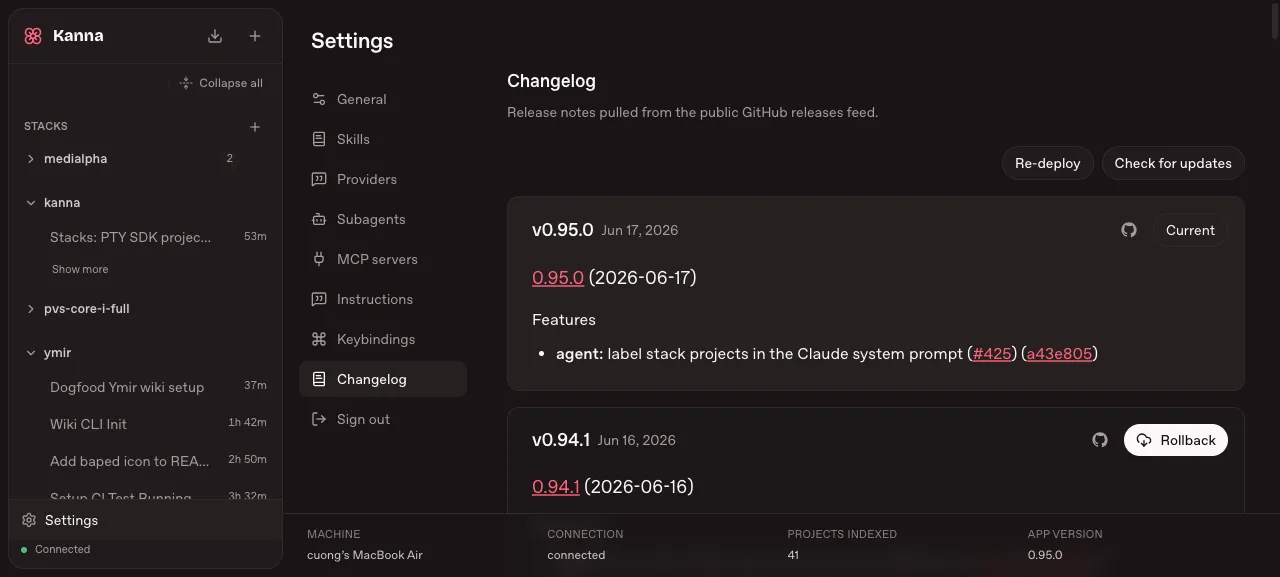
One sidebar, every project
The left rail lists every repo I’m working in — kanna, ymir,
pvs-core-i-full, trancuong, and a dozen more. Each holds its own chats with
live timers, so a glance tells me which agents are still running and which
finished hours ago. No window hunting.
The status bar at the bottom is the part I didn’t know I wanted: machine, connection state, and 41 projects indexed. The agent isn’t guessing at my layout — it has the whole workspace mapped.
Settings is where the behavior lives
Most agent tools bury their config. Kanna puts it one click away: Skills, Subagents, MCP servers, and Instructions each get a panel.
stateDiagram-v2
  [*] --> Prompt
  Prompt --> MainAgent: I ask
  MainAgent --> Skill: matches a skill?
  Skill --> MainAgent: loaded
  MainAgent --> Subagent: focused work?
  Subagent --> MainAgent: returns summary
  MainAgent --> Worktree: code change
  Worktree --> PR
  PR --> [*]
Subagents are the lever I lean on hardest. When a task is self-contained — “locate every caller of this function”, “review this diff” — I hand it to a specialized subagent that runs in its own session and reports back a summary. My main chat stays readable instead of drowning in tool output.
The rules that make it safe
Two project rules turn this from “fun” into “trustworthy”. Every change starts
with a git pull on main and runs inside a git worktree, never the live
branch — the same discipline I wrote about in
wtguard. When the work is done, the agent
opens a PR; it never merges to main on its own.
That’s the whole reason I can let several agents run at once without watching each one. The blast radius of any single chat is a branch and a pull request, nothing more.
The terminal-tab era is over for me. One tab, every project, agents that keep working while I read something else.